Skip to content

Rubber Stamp Requirement Approvals in EWM

  • by

In Systems Engineering, “Rubber Stamping” is usually a bad thing, but when it comes to tool automation, it’s a lifesaver.

If you use DOORS Next Change Sets, you’ve likely run into the constraint requiring an “Approved” Work Item in EWM to deliver. The problem? EWM doesn’t care if the status is “Approved”; it wants a formal record in the Approvals tab. This creates a manual bottleneck for teams doing offline reviews or using integration tools like IBM Integration Hub Planview (Tasktop).

In this video, I demonstrate a custom EWM plugin I built that acts as a “Rubber Stamp” bot. It automatically triggers a formal approval the moment a Work Item hits a specific state.

What we cover:

  • The difference between “Status” and “Formal Approval” in EWM.
  • Why DOORS Next Change Set deliveries get blocked.
  • A walkthrough of the Auto-Approval Plugin (Web UI — there is an Eclipse version as well).
  • How this enables seamless automation with IBM Engineering Integration Hub or other automations that interact with the EWM REST API.

Redact Your REQIF

  • by

In this Engineering Tool Tip focused on IBM DOORS Next, Kevin shows how to send create REQIFs from modules filtered by a view.

The best thumbnail to a youtube video Kevin has ever made.

Filmed from #ibm #TechXChange2024 !

Major shout out to our friends at Requisis!

Visit https://www.baselinesinc.com for more information about our services in support of IBM Engineering Products. For licensing quotes, demos, or follow-ups contact sales@baselinesinc.com

DOORS Next Can Do That?!

  • by

In this IBM Engineering Tool Tip video, I go over a feature that exists in DOORS Next that is hidden. It lets you see extended information about the other side of an RM link. In fact, while making this video, I found they added yet another feature IBM added to this feature that I didn’t even know about! Check it out to level up your DOORS Next mastery!

Mary Had Ambiguous Requirements, Whose Text Was Hard To Know

  • by
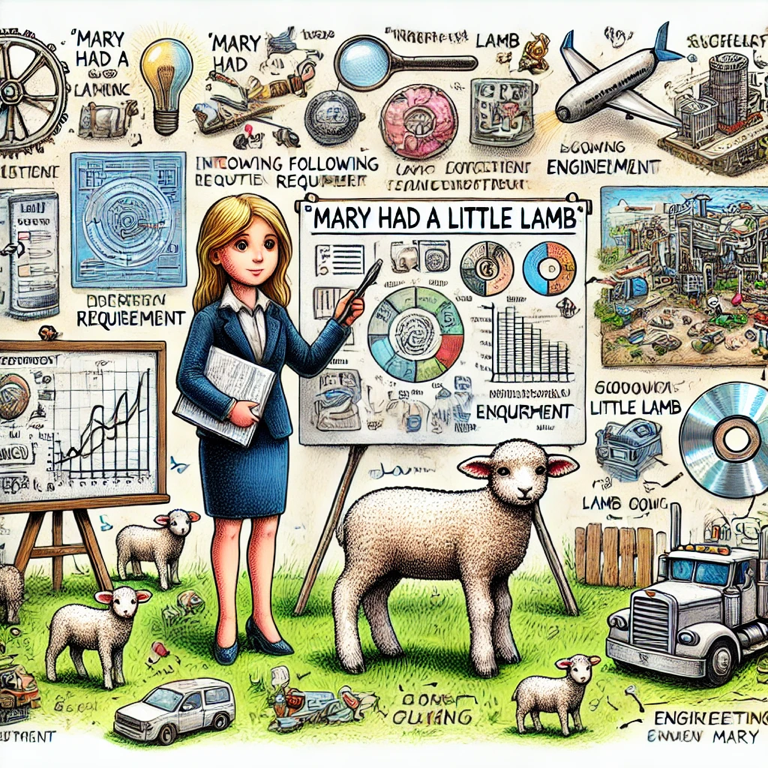
Mary breaks down the requirements of her lamb to her business audience.

In the world of engineering, clarity is king. No matter what you’re working on, the way you communicate requirements can make or break the success of the entire effort. 

A great example that I often refer to is “Mary Had a Little Lamb.” It’s a simple example, hearkening back to childhood, but it’s powerful in illustrating how easily things can go awry with vague or ambiguous requirements.

How do you interpret “Mary Had a Little Lamb”?

At first glance, this statement seems straightforward, but let’s break it down. Depending on who’s reading it, this simple sentence could be interpreted in several very different ways:

  • Mary owned a small lamb: Most people might initially assume that this means Mary had possession of a lamb that was small in size.
  • Mary consumed a lamb: Did Mary eat lamb for dinner?
  • The lamb was small only at a specific time: Maybe the lamb was little only during the time Mary had it, but it grew later.
  • Mary was followed by a lamb: If we’re being poetic, perhaps the lamb followed Mary around and not just to school one day. (Pro tip: Don’t be poetic when writing requirements.)
  • Mary gave birth to a lamb: In some contexts, “had” could imply that Mary gave birth to the lamb, which introduces a whole different scenario.

The Engineering Context

When you’re writing engineering requirements, this kind of ambiguity is the last thing you want. Imagine if each member of your team interpreted a requirement differently—one builds a system to own a lamb, another builds one to eat it, and a third builds it to follow someone around. The result? Chaos, rework, and a lot of wasted time and resources.

“Mary Had a Little Lamb” underscores the importance of being specific, detailed, and clear in your requirements. In engineering, there is no room for assumptions or vague language. What might seem obvious to you could be interpreted in entirely different ways by others.

Avoiding Ambiguity in Requirements

To avoid the pitfalls that our friend Mary encountered, here are a few strategies for writing clear engineering requirements:

  • Use precise language: Words like “little,” “some,” or “often” can be open to interpretation. Be specific with quantities, sizes, and timelines.
  • Avoid ambiguous terms: Replace words that can have multiple meanings with more explicit terms. Instead of saying “She had a lamb,” say “Mary owns a lamb that weighs 20 pounds (with +/- 2 oz. tolerance if that’s acceptable, of course).”
  • Clarify assumptions: Don’t assume everyone has the same background knowledge. Spell out any assumptions that could affect understanding. Using the Terms feature in DOORS Next to create a dictionary for your project is a great way to avoid problems down the line.
  • Provide context: If a requirement cannot be understood by itself, ensure it’s completely understood when viewed as part of a traceability matrix. Requirements Management tools like DOORS and DOORS Next can really help ensure that the related context up and down the Systems Engineering V is always visible to users. 
  • Can you test it?: What would the steps for testing whether Mary did indeed have a little lamb be? Writing a proposed test and working backwards from the test steps could not only help your requirements be written better, but considering testing from the start could affect the entire design of your system. Plus, your testers will thank you for involving them early and often, leading to a more cohesive team.

The Takeaway

“Mary Had a Little Lamb” is a simple reminder that in engineering, the devil truly is in the details. When requirements are clear and unambiguous, teams can align more easily, work more efficiently, and ultimately, deliver better results. So, the next time you’re drafting a requirement, remember Mary and her lamb—and make sure there’s no room for misinterpretation.

Clear communication is the foundation of success, whether you’re managing a small project or complex system. Let’s ensure our engineering requirements are as precise as our engineering itself.

DOORS Next 7.0 is GA!

  • by

It’s taken a while, but today the wait is over. IBM Engineering Requirements Management DOORS Next 7.0 has been officially released!

As always, IBM has an overview of what’s new and noteworthy. But here are things we’d like to highlight as being significant.

Greatly improved performance

I hear that in some use cases, performance of the tool has gone up anywhere from 4x to 9x! Rumor is that Oracle DBs have shown the most improvements. This is reason alone to upgrade.

DNG has been renamed

It was not only DOORS Next Generation, but every tool has now been renamed. This was announced about a year ago by IBM. I’m still getting used to it, as are our clients. DOORS Next got the easiest adjustment.

Suspect Links Have Been Replaced With Link Validity

It’s no secret that IBM developers sometimes overcomplicate things. Suspect Links vs. Link Validity is one of those things. It took me a while to wrap my head around the concept.

Starting in 7.0, there is only Link Validity. I think this is a good thing overall and look forward to simplifying the explanation of things to my users.

This also corresponds to Link Validity being reportable in JRS! I worked really closely with IBM support to develop a report for one of my clients in 6.0.5, and it’s great to know that pain is now gone.

View columns are preserved when you switch to folders

In previous versions of the tool, you’d be in your folders view, and insert a few columns. Then you’d click a new folder, and you’d lose your columns. I worked with the DOORS Next developers on this and gave them feedback on how it should work. My feedback has been incorporated into the tool.

Yellow row highlight for new and copied artifacts cleared automatically

My users asked for this years ago, and now they have received.

Module and Collections pages no longer show the base artifacts folder

Chalk up another implementation that I’ve been asking for, for years. This is huge from a usability perspective.

Automatic type mapping for ReqIF imports

If you are involved in multiple imports/exports from ReqIF files, this should make things much smoother and less error prone.

Improved pages for empty collections and modules

Yet another one I’ll take some credit for — I’ve given DOORS Next developers feedback that it was not obvious to users how to paste an artifact into an empty module. It is now obvious.

ELM 7.0 – What’s New

  • by

IBM released Engineering Lifecycle Management 7.0 for general release today, and while we’ve covered Requirements Management with DOORS Next in some detail, we wanted to also cover highlights of the rest of the suite.

Engineering Lifecycle Management

Name Changes

All of the applications have had their names changed, for better or for worse. I think some of these are going to have a hard time sticking. That said, here are the new names across the board:

Old Name Old Acronym New Name New Acronymn
Rational or Collaborative Lifecycle Management or Continuous Engineering CLM or CE IBM Engineering Lifecycle Management ELM
Rational DOORS DOORS DOORS Family DOORS
Rational DOORS Next Generation DNG DOORS Next DOORS Next
Rational Rhapsody Rhapsody
Rational Rhapsody Design Manager RDM Rhapsody – Design Manger RDM
Rational Rhapsody Model Manager RMM Rhapsody – Model Manager RDM
Rational Quality Manager RQM Engineering Test Management ETM
Rational Team Concert RTC Engineering Workflow Management EWM
Rational Publishing Engine RPE Publishing PUB
Rational Engineering Lifecycle Manager RELM Engineering Insights ENI
Rational Method Composer Method Composer MEC

The above is not the official IBM names to a T–I’ve slightly abbreviated some things. Keep that in mind.

New Look And Feel

The product banner looks much more modern.

Engineering Test Management

Clustering with Liberty Server

In theory this will improve performance. Please contact us or leave a comment below if you’re using this feature.

Improved Test Execution Performance

500 adapters running in parallel are supported! Pretty huge improvement there.

Mail Notifications

I actually developed a workaround for not having this years ago. It’s finally in the tool, fully supported!

LQE Manage Skipped Resources

You can ignore individual resources when LQE fails on a given artifact. Again, big improvement here.

Customize The “Related Information” Panels

I’ve never had a client ask for this, but I’m glad this is there.

Engineering Workflow Management

Improved Git Integration

  • Command line script to make installation easier available for Node.js and Gitlab servers.
  • Integration with Bitbucket server
  • New process preconditions for Git Push operations

Duplicate a Change Set

This is interesting and I am not sure of why you would want to do this, but you can duplicate an active change set in Eclipse and Visual Studio.

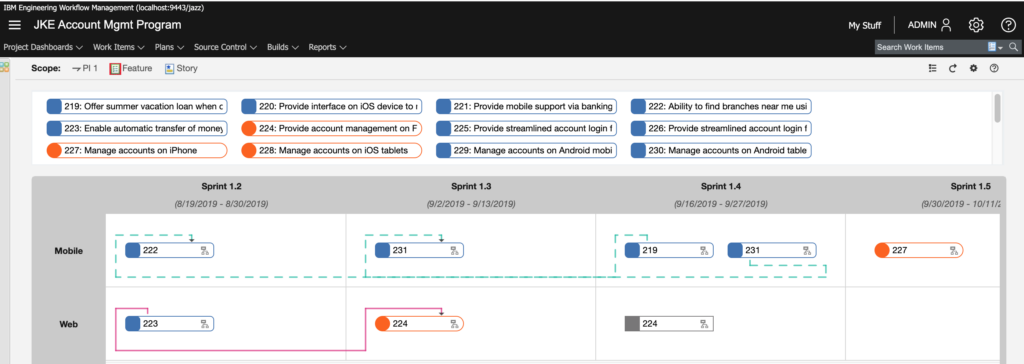
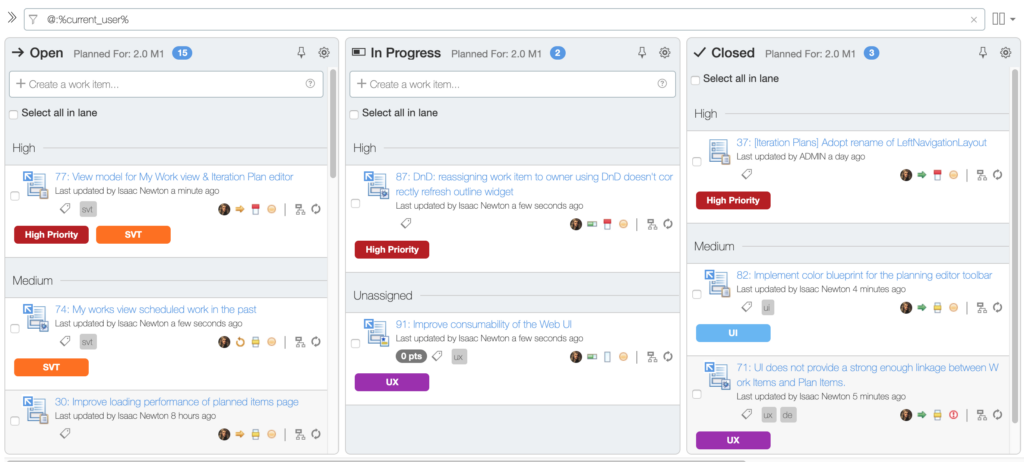
Improved Look and Feel for Quick Planner and Program Board

The program board in particular looks fantastic! Of note, color tags are supported as well.

EWM 7.0 Program Board Improvement
Color Tags in Quick Planner EWM 7.0

Publishing (Previously Rational Publishing Engine)

Unfortunately, there’s not much to report here as far as our interests. The improvements appear to have all gone to Document Builder and not to the Publishing thick client.

As an aside, it’s going to be very difficult for me to call it just “Publishing.” Really wish Publishing Engine had stuck instead.

Jazz Report Builder (JRS)

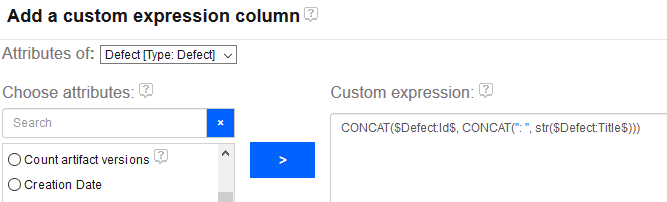
Custom Expressions Support Multiple Attributes

Previously, a report author could only create a custom column with a calculation on a single attribute. For instance, it was not possible to calculate a RPN for an FMEA-style report by creating a custom column that inspected both Likelihood and Occurence. You could only make a column that say, truncated Likelihood and that’s it. This was a *severe* limitation.

Enter version 7.0!

CLM 6.0.4 Released

  • by

Just wanted to give a heads up that IBM CLM 6.0.4 was released yesterday on jazz.net. Keep watching this space for details of new features.

IBM CLM 6.0.3 Released!

  • by

IBM released the latest version of Collaborative Lifecycle Management (CLM) 6.0.3 a few weeks ago. As always, I like to go over the highlights.

DOORS Next Generation 6.0.3

This release feels a bit more focused as far as improvements go. If you’ve opted in to Configuration Management, you’ll notice that there is now support for components, allowing you to more easily setup your projects for CM. You’ll no longer need a separate DNG project area for each system your needs, but rather you can create one DNG project and then define components of that project.

If that sounds confusing, worry not, as I’ll be covering components in detail very soon.

You’ll also notice that navigation has been streamlined. In previous versions  of DNG, there was an Artifacts menu and a Modules menu. Now there is just an Artifacts menu and it can be filtered to just display modules. And filtering is a bit easier.

ReqIF has also been enhanced, especially for those of you migrating from DOORS 9. For DOORS 9 users, you can know map Object Type to Artifact Type for everything except modules. This is YUGE. It’s such a big deal that I used one of the 603 milestone releases to test it out and actually found a bug that development fixed before release. This functionality can be enhanced to be sure, but I’m just very glad that it’s finally there.

The diagram editor now allows for UI diagramming. Things like menu bars, sliders, radio buttons, etc.

With 6.0.3, DNG users can link across projects.

There have also been miscellaneous improvements that have not been called out explicitly by IBM. One that I noticed, directly from one of my clients is this: In DNG, when working in a module and pressing control-enter to create a new requirement, there was a 2-3 second delay while the old requirement was being saved. During this delay, the user could not write their new requirement. They had to wait for the 3 seconds and then they could write. This tiny thing was fixed, and it really does make the tool feel faster, especially for those of us who heavily use keyboard shortcuts.

Rational Quality Manager 6.0.3

RQM 6.0.3 also supports components.

RQM 6.0.3 now features global categories! You can also make certain categories apply to multiple artifact types.

RQM also now has a compare artifacts feature, and along with version history, it’s pretty jazzy (no pun intended) if I do say so myself.

You can now link RQM artifacts directly to files source controlled in RTC! I haven’t tested this yet but I’m glad the functionality to link to files is finally there.

RQM 6.0.3 now supports drag and drop linking and better artifact navigation.

Rational Team Concert 6.0.3

Lots of tweaks for builds are in RTC 6.0.3. Log files can now be filtered (ie, show me logs with errors), timestamps can be preserved on load and improved Jenkins compatibility. Build engine definitions can now be imported and exported.

The Eclipse thick client now requires Eclipse 4.2. Eclipse 3.6 is no longer supported.

The Visual Studio plugin now supports task editing.

Files in SCM can be linked to other CLM artifacts, as mentioned above in the RQM section.

A pending changes view has been added to the Windows RTC shell.

Git integration now supports work items with a hashtag keyword. So you could say, “This changeset addresses task #786” and the integration will know what you’re talking about.

You can more easily display all changesets implemented during a given release.

There’s undo merge functionality.

Jazz Report Builder 6.0.3

Here’s the big one on this release: You can trace multiple relationships from the same artifact.

The displayed columns of a report can now be rearranged via drag and drop. Column widths can also be set and be sticky.

A report can now have multiple owners set.

There’s a new “tour” guide for new users.

Dialog boxes are now resizable.

Types and attributes now have a pop-up tooltip type help system.

You can filter on multiple text values when a report is run.

The order of the legend in the graph can now be set.

Users can filter report via component (via LQE).

There really is much more, including new trend reports, new SCM file reporting capability, curved trend lines among others.
IBM Rational Jazz Collaborative Lifecycle Management 6.0.1 Released!

  • by

IBM just released the latest version of their Collaborative Lifecycle Management (CLM) suite, which includes DOORS Next Generation (DNG), Rational Team Concert (RTC) and Rational Quality Manager (RQM). This is a huge update and I think it lays the foundation for the future direction of the tool.

CLM 6.0 was marked by configuration management (CM) appearing for DNG and RQM, however there were limitations on opting-in to CM. Many of those limitations are now removed, and instead of focusing solely on CM, the developers of all the applications were able to focus on adding new features and refining existing ones.

I’m not kidding when I say the changelist is huge, so grab yourself some coffee and dig in for all of these new features, which are available right now from Jazz.net! Here are some of the new features and changes I find most notable.

DOORS Next Generation

  • Link Validity – Instead of just monitoring for suspect links, users can be more active and tell the tool whether links are valid. I’m still wrapping my head around this concept and how it will be used, but I do think the theory behind it is sound. If users can mark a link as not valid before having a change process to review and remove it, then it could make it easier for owners on the other end of the link to understand that there are issues before they arrive.
  • Link By Attribute – Makes it easy to create bulk links! I believe there will still be confusion due to the linking to a module/base artifact differences but people like me will know how to train the end users.
  • Link Constraints – Makes it so that artifacts of one type can only link to certain other artifacts. This is another great thing to have and brings DNG further ahead of DOORS 9. The theory behind OSLC and Jazz is that you can link to anything at anytime, but this violates a core principle of requirements management. I’m glad the DNG team put the user experience ahead of the theoretical foundations of their toolset.
  • Round Trip CSV – Another finally! We’ve been wanting this since 2012! I also like how it’s just integrated with the import requirement screen. Very nice, though as always there are limitations. A quick one I saw was the inability to change an artifact’s type via CSV. Makes sense on one level, but on another level, I can change an artifact’s type via the DNG GUI. But that’s just a nit-pick. This one change will make automations much easier to implement, and unlike DOORS 9, you can even delete requirements via CSV!
  • Tie changes to RTC work items – The hooks to allowing DNG to completely manage change from RTC are finally here. Can’t wait to try this out! This will make it so that all changes to production requirements must go through a work item. The DOORS 9 to RTC integration has had this for a while and it’s great that DNG is now getting it too.
  • Dashboard Widgets Are Now CM Aware – Better late than never. This is one of the reasons I advised my clients to hold off on implementing CM in their DNG 6.0 environments.
  • Improved resolutions of CM delivery conflicts of Modules (Module Merge) – Yet another vital improvement.
  • Version-aware Jazz Reporting Service – Again, the ability to report on DNG streams is a requirement, and another reason I suggestion people hold off before. Now I don’t have as much of a reason.
  • Filter by Artifact ID! – I’ve needed this for so long.
  • DOORS 9 to DNG Migration Package – It’s easier to get data from DOORS 9 to DNG, and this is great for testing all of the improvements made in DNG. There are still limitations in artifact mapping from DOORS 9 to DNG that people migrating ought to be aware of. Still, it’s nice to see significant improvement in this area as pure ReqIF alone had could have its own issues.
  • Right-click for the action (pencil) Menu – You can hide the pencil column and do right-click only if you want, or you can have both. A much needed UX enhancement.

See more information about what’s new in DOORS Next Generation 6.0.1.

Rational Quality Manager

  • Reconcile Requirements Progress Indicator – Now when users go to reconcile their requirements from DNG, they can see a progress bar. Great for large sets of requirements in test plans.
  • Improved pasting of images in manual test scripts – This leads to better tool usability and better exports from RPE.
  • Editable Environments in TCERs – Execution Records can now have their environments changed. I can’t think of a great use case for this but I’m sure it’s there because someone asked.
  • Ability to specify that TCERs can’t be run in certain cases – can’t be run without being attached to a test plan, iteration, or environment. This is great for managers who want to enact good processes without having to control everything in the tool themselves.
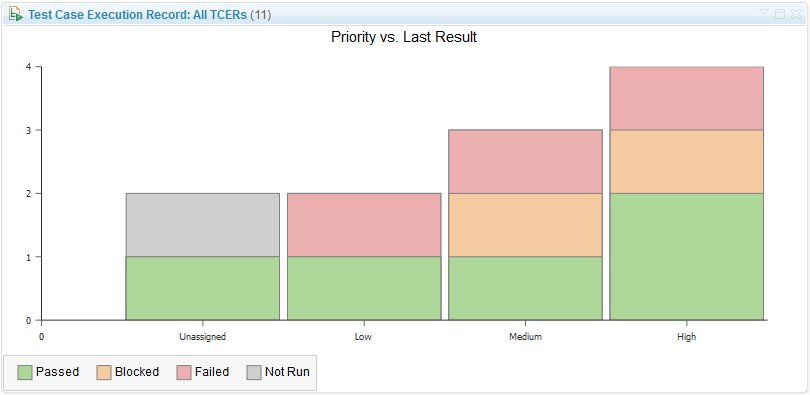
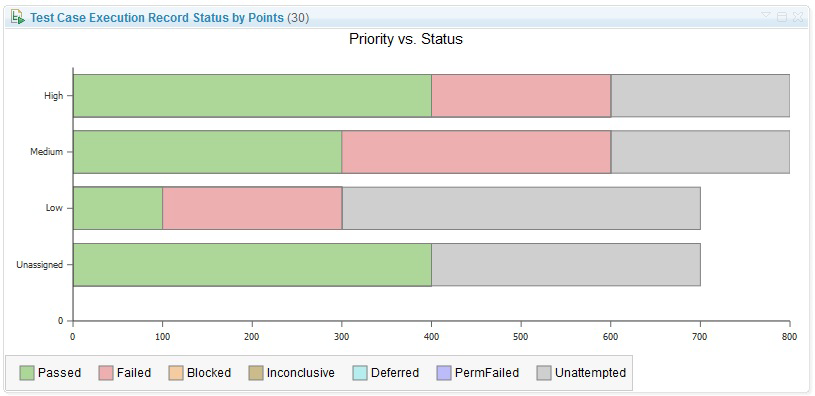
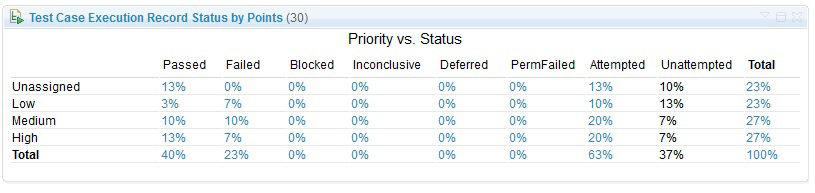
  • Some awesome new dashboard widgets – These are great!Test_Matrix_ViewletStackedBarTablePercentage
  • Link Validity is implemented in RQM as well!
  • New artifacts available in Jazz Reporting Service –  You can now report on Test Environment, Test Data, and Keywords. You can also see the category hierarchy in JRS.
  • Table view filtering improvements – Really too many to list. One of my favorites is “show me which test cases don’t have test scripts”.
  • RQM can import requirements from DNG Project Areas with CM enabled – Again, this is absolutely necessary before any companies that use both RQM and DNG can opt-in to CM.

See more information about what’s new in Rational Quality Manager 6.0.1.

Rational Team Concert

  • My Stuff Menu Item – See all of your work items across all projects with a single click.
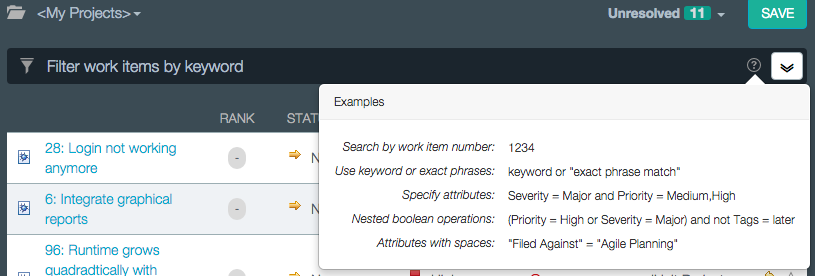
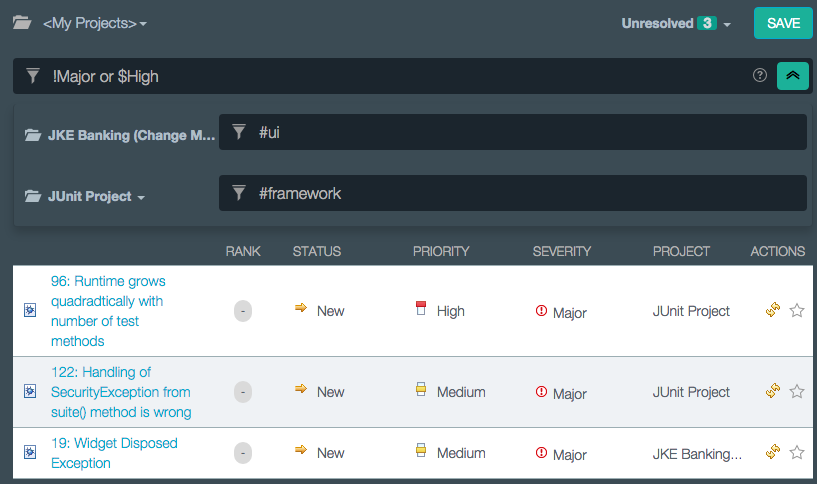
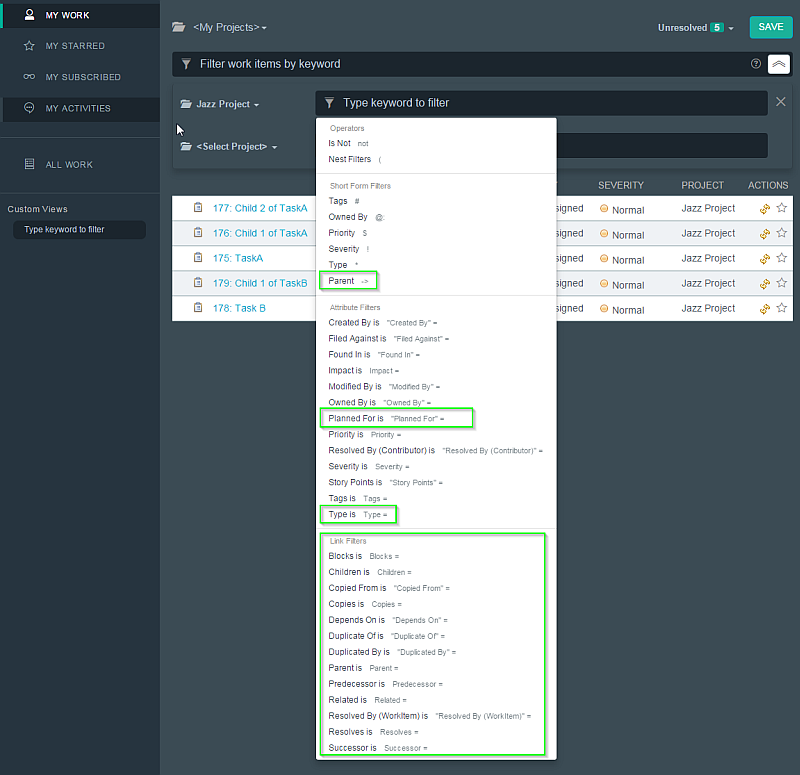
  • Query by typing commands – These images do a good job of explaining:
    commonFiltering
    advanceFiltering1
    I really like the -> notation for “Parent link”MyStuff_NewAdvancedFilteringProposals
  • Bulk editing of Work Item fields in Quick Planner, My Stuff screens
  • CM Linking from Work Items Is Now Available
  • Local changes preserved when reloading an out of sync project – Anything that lets me preserve changes if I click the wrong thing is always fine with me!
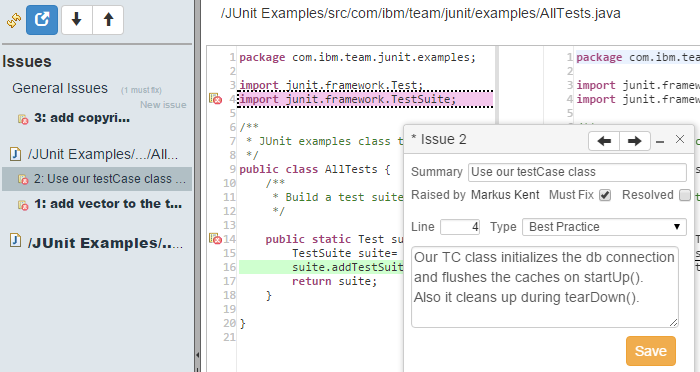
  • Online code review – I really like this one!
    CR_editor3
  • New methods to set direction of flow targets – Users can do this from RTC, VS, and the command-line. In the GUIs, its done via the “Change Flow…” button. In the command line it’s done via the set flowtarget command.
  • Restrict flows to components in a stream – Admins can set rules that component X must be delivered to by stream Y and only stream Y. Very useful!
  • Custom attributes on more artifact types – file versions, baselines, snapshots, streams, and now components allow for custom attributes.
  • Lots of git integration improvements
  • Improved Jenkins plugin and authentication
  • Build reports GUI improvements all over the place
  • RTC 6.0.1 supports Microsoft Visual Studio 2015
  • Delete multiple remote workspaces at once
  • Pattern-based component search
  • Work Item Auto Subscribe for Commenters

See more information about what’s new in Rational Team Concert 6.0.1.

Jazz Reporting Service

  • Improved Add Calculated Column Dialog Boxes
  • Time range support with drill-down when counting artifacts
  • Dynamic filtering is made more prominent in the GUI
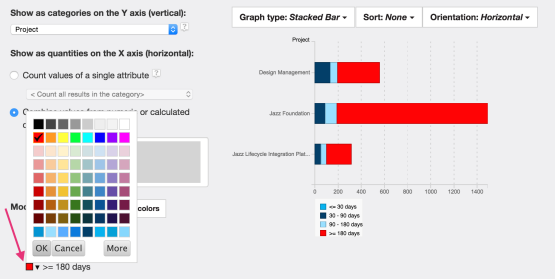
  • Custom Graph Colors – FINALLY!builder10
  • Historical Trend Reporting for the Data Warehouse
  • Set a goal linebuilder13

See more information about what’s new in the Jazz Report Builder (JRS), Data Collection Component (DCC), and Lifecycle Query Editor (LQE) applications.

Jazz Foundation

  • Online migration from one Jazz Server to Another – May make it easier to set up sandbox servers? I need to dive into this one.
  • WebSphere Liberty replaces Apache Tomcat – I’m really not sure what to think about this one. The good news is that Tomcat is still supported and can still be used.
  • Team Concert now supports integrated Windows Authentication

See more information about what’s new in the Jazz Team Server applicationJazz Team Server application..

Kevin Murphy

Chat with us!

Work with an IBM Champion to master your ELM tools.

Get in touch