IBM just released the latest version of their Collaborative Lifecycle Management (CLM) suite, which includes DOORS Next Generation (DNG), Rational Team Concert (RTC) and Rational Quality Manager (RQM). This is a huge update and I think it lays the foundation for the future direction of the tool.
CLM 6.0 was marked by configuration management (CM) appearing for DNG and RQM, however there were limitations on opting-in to CM. Many of those limitations are now removed, and instead of focusing solely on CM, the developers of all the applications were able to focus on adding new features and refining existing ones.
I’m not kidding when I say the changelist is huge, so grab yourself some coffee and dig in for all of these new features, which are available right now from Jazz.net! Here are some of the new features and changes I find most notable.
DOORS Next Generation
- Link Validity – Instead of just monitoring for suspect links, users can be more active and tell the tool whether links are valid. I’m still wrapping my head around this concept and how it will be used, but I do think the theory behind it is sound. If users can mark a link as not valid before having a change process to review and remove it, then it could make it easier for owners on the other end of the link to understand that there are issues before they arrive.
- Link By Attribute – Makes it easy to create bulk links! I believe there will still be confusion due to the linking to a module/base artifact differences but people like me will know how to train the end users.
- Link Constraints – Makes it so that artifacts of one type can only link to certain other artifacts. This is another great thing to have and brings DNG further ahead of DOORS 9. The theory behind OSLC and Jazz is that you can link to anything at anytime, but this violates a core principle of requirements management. I’m glad the DNG team put the user experience ahead of the theoretical foundations of their toolset.
- Round Trip CSV – Another finally! We’ve been wanting this since 2012! I also like how it’s just integrated with the import requirement screen. Very nice, though as always there are limitations. A quick one I saw was the inability to change an artifact’s type via CSV. Makes sense on one level, but on another level, I can change an artifact’s type via the DNG GUI. But that’s just a nit-pick. This one change will make automations much easier to implement, and unlike DOORS 9, you can even delete requirements via CSV!
- Tie changes to RTC work items – The hooks to allowing DNG to completely manage change from RTC are finally here. Can’t wait to try this out! This will make it so that all changes to production requirements must go through a work item. The DOORS 9 to RTC integration has had this for a while and it’s great that DNG is now getting it too.
- Dashboard Widgets Are Now CM Aware – Better late than never. This is one of the reasons I advised my clients to hold off on implementing CM in their DNG 6.0 environments.
- Improved resolutions of CM delivery conflicts of Modules (Module Merge) – Yet another vital improvement.
- Version-aware Jazz Reporting Service – Again, the ability to report on DNG streams is a requirement, and another reason I suggestion people hold off before. Now I don’t have as much of a reason.
- Filter by Artifact ID! – I’ve needed this for so long.
- DOORS 9 to DNG Migration Package – It’s easier to get data from DOORS 9 to DNG, and this is great for testing all of the improvements made in DNG. There are still limitations in artifact mapping from DOORS 9 to DNG that people migrating ought to be aware of. Still, it’s nice to see significant improvement in this area as pure ReqIF alone had could have its own issues.
- Right-click for the action (pencil) Menu – You can hide the pencil column and do right-click only if you want, or you can have both. A much needed UX enhancement.
See more information about what’s new in DOORS Next Generation 6.0.1.
Rational Quality Manager
- Reconcile Requirements Progress Indicator – Now when users go to reconcile their requirements from DNG, they can see a progress bar. Great for large sets of requirements in test plans.
- Improved pasting of images in manual test scripts – This leads to better tool usability and better exports from RPE.
- Editable Environments in TCERs – Execution Records can now have their environments changed. I can’t think of a great use case for this but I’m sure it’s there because someone asked.
- Ability to specify that TCERs can’t be run in certain cases – can’t be run without being attached to a test plan, iteration, or environment. This is great for managers who want to enact good processes without having to control everything in the tool themselves.
- Some awesome new dashboard widgets – These are great!
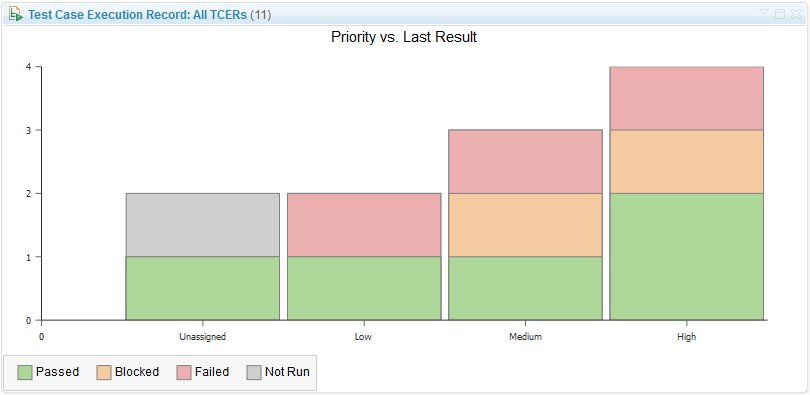
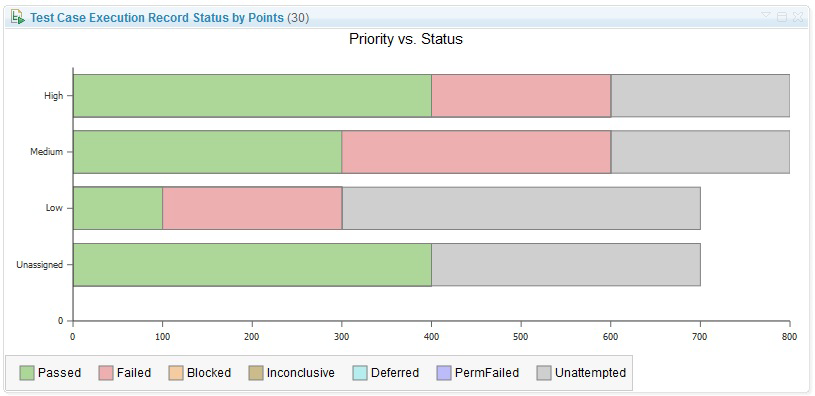
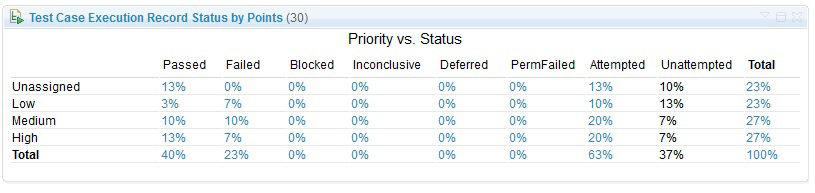
- Link Validity is implemented in RQM as well!
- New artifacts available in Jazz Reporting Service – You can now report on Test Environment, Test Data, and Keywords. You can also see the category hierarchy in JRS.
- Table view filtering improvements – Really too many to list. One of my favorites is “show me which test cases don’t have test scripts”.
- RQM can import requirements from DNG Project Areas with CM enabled – Again, this is absolutely necessary before any companies that use both RQM and DNG can opt-in to CM.
See more information about what’s new in Rational Quality Manager 6.0.1.
Rational Team Concert
- My Stuff Menu Item – See all of your work items across all projects with a single click.
- Query by typing commands – These images do a good job of explaining:
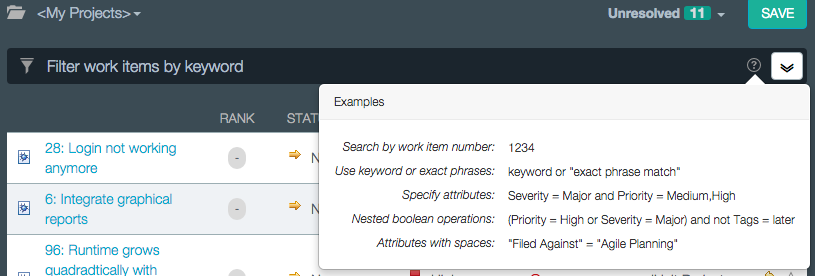
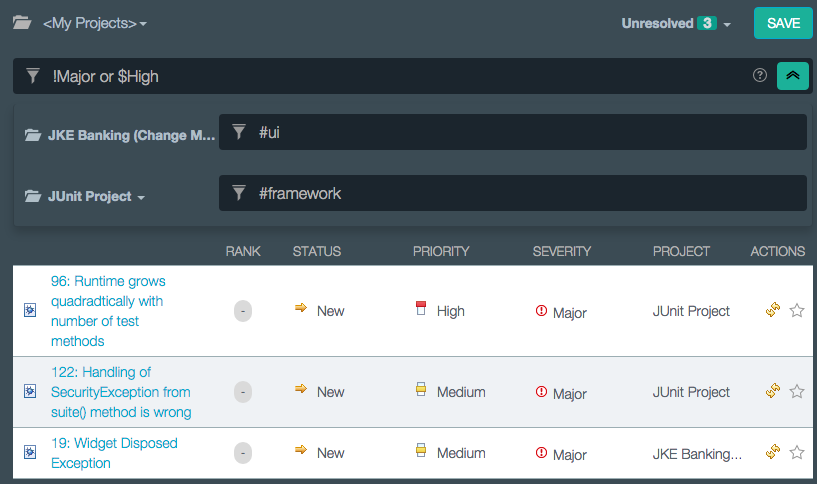
I really like the -> notation for “Parent link”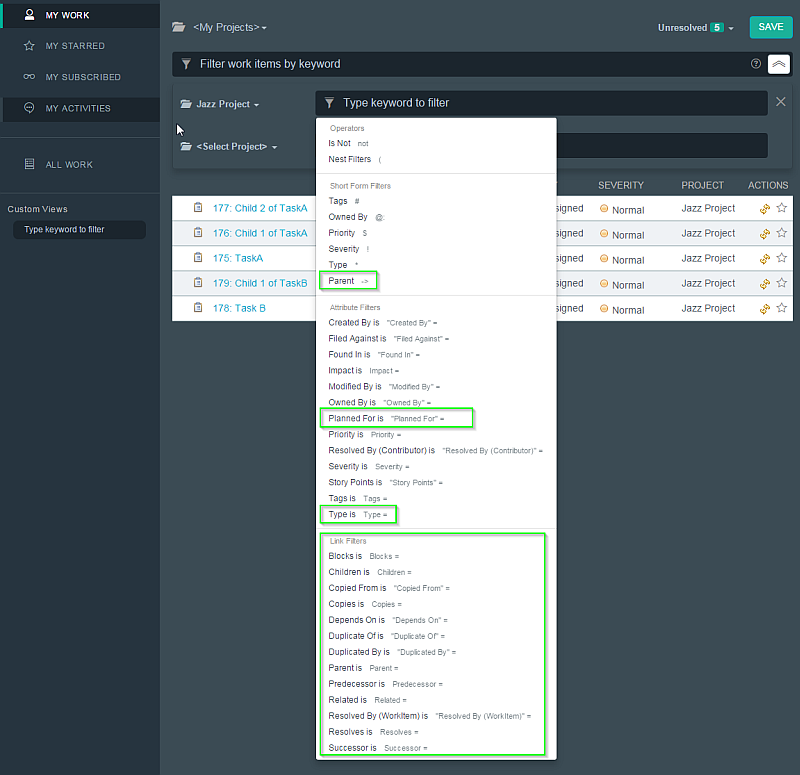
- Bulk editing of Work Item fields in Quick Planner, My Stuff screens
- CM Linking from Work Items Is Now Available
- Local changes preserved when reloading an out of sync project – Anything that lets me preserve changes if I click the wrong thing is always fine with me!
- Online code review – I really like this one!
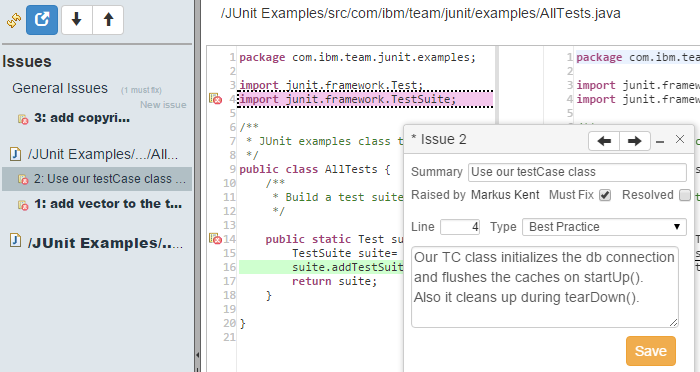
- New methods to set direction of flow targets – Users can do this from RTC, VS, and the command-line. In the GUIs, its done via the “Change Flow…” button. In the command line it’s done via the set flowtarget command.
- Restrict flows to components in a stream – Admins can set rules that component X must be delivered to by stream Y and only stream Y. Very useful!
- Custom attributes on more artifact types – file versions, baselines, snapshots, streams, and now components allow for custom attributes.
- Lots of git integration improvements
- Improved Jenkins plugin and authentication
- Build reports GUI improvements all over the place
- RTC 6.0.1 supports Microsoft Visual Studio 2015
- Delete multiple remote workspaces at once
- Pattern-based component search
- Work Item Auto Subscribe for Commenters
See more information about what’s new in Rational Team Concert 6.0.1.
Jazz Reporting Service
- Improved Add Calculated Column Dialog Boxes
- Time range support with drill-down when counting artifacts
- Dynamic filtering is made more prominent in the GUI
- Custom Graph Colors – FINALLY!
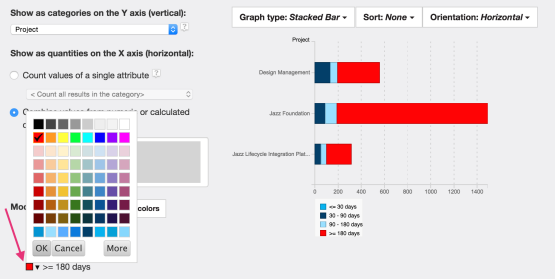
- Historical Trend Reporting for the Data Warehouse
- Set a goal line

See more information about what’s new in the Jazz Report Builder (JRS), Data Collection Component (DCC), and Lifecycle Query Editor (LQE) applications.
Jazz Foundation
- Online migration from one Jazz Server to Another – May make it easier to set up sandbox servers? I need to dive into this one.
- WebSphere Liberty replaces Apache Tomcat – I’m really not sure what to think about this one. The good news is that Tomcat is still supported and can still be used.
- Team Concert now supports integrated Windows Authentication
See more information about what’s new in the Jazz Team Server applicationJazz Team Server application..