Skip to content

IBM Rational Jazz Acronyms Defined And Demystified!

  • by
Image from blogs.adobe.com

Having done well over a decade of IBM Rational DOORS Administration, I was looking forward to moving to IBM Rational DOORS Next Generation to learn something new. And boy, with IBM Rational Jazz there’s a lot to learn! Making the learning curve a bit harder than it already is, IBM speaks in acronyms. What do they all mean? See below! This list will be updated as new acronyms are found.

ALM – Depracated. See CLM.

CCM – Chance and Configuration Management. This is how IBM refers to Rational Team Concert within the Jazz itself.

CLM – Collaborative Lifecycle Management. CLM was originally called ALM for Application Lifecycle Management. When IBM refers to CLM in a commercial context, they’re talking about Rational DOORS Next Generation, Rational Team Concert, and Rational Quality Manager collectively. A license for CLM is good for all three applications.

DNG – DOORS Next Generation. The official acronym is RDNG.

IBM – International Business Machines.

JTS – Jazz Team Server. It manages users and licenses in a CLM deployment.

OSLC – Open Services for Lifecycle Collaboration. An open set of standards to implement engineering artifact types into your own application. If your application can speak the language of OSLC, it can be integrated with other OSLC applications. Find out more at the official OSLC web page.

PLE – Product Line Engineering. A method of deriving different products from common requirements. An example would be a car. One version has a 180hp engine, another a 220 hp engine. Both engine types are supported in cars that are convertible and hardtop. Total of four different products with four sets of requirements and design, but sharing the majority of requirements, design, and packaging. That is product line engineering.

PLM – Product Lifecycle Management. PLM software manages the entire product lifecycle, from development to implementation. Can encompass everything from customer relations, supply line, bill of materials, documentation, requirements, code, etc. Typically businesses use these systems as repositories representing the system in release/production. CLM applications, therefore, would integrate or output their data into a PLM system where it would be read-only.

QM – Quality Management. This is how IBM refers to Rational Quality Manager within the application itself.

RDNG – Rational DOORS Next Generation. Runs on Jazz Application Framework. Used for Requirements Management. Used to be known as Rational Requirements Composer.

RELM – Rational Engineering Lifecycle Manager. IBM Rational Engineering Lifecycle Manager visualizes, analyzes and organizes engineering lifecycle data and data relationships. It enables product development teams to search and query engineering data that is stored and managed in multiple sources and locations.

REST – Representational State Transfer. Per the Wikipedia REST page, REST is an architectural style consisting of a coordinated set of architectural constraints applied to components, connectors, and data elements, within a distributed hypermedia system. REST ignores the details of component implementation and protocol syntax in order to focus on the roles of components, the constraints upon their interaction with other components, and their interpretation of significant data elements.

RM – Requirements Management. This is how IBM refers to DOORS Next Generation within the application itself.

RQM – Rational Quality Manager. Runs on Jazz Application Framework. Used for Test and Quality Management.

RRC – Deprecated. See RDNG.

RPE – Rational Publishing Engine. This application works with any REST compatible data source as well as Rational DOORS to produce documents from the selected data sources.

RRDG – Rational Reporting for Document Generation. A lightweight version of Rational Publishing Engine that is built in to DOORS Next Generation. RRDG uses templates defined in RPE to generate documents. It does not generate graphs and charts.

RRDI – Rational Reporting For Development Intelligence. A lightweight version of Cognos Insight also known as Rational Reporting. RRDI reports are database-driven, like Crystal Reports. Quick lists, graphs, and charts are the best RRDI reports. Though it’s possible to layout documents with RRDI, it’s not really the common usage.

RTC – Rational Team Concert. RUns on Jazz Application Framework. Used for Project Management, Task Management, Source Code Control and Versioning, and Build Automation (including Continuous Releases).

URI – Uniform Resource Indicator. The URI combines the URL and URN. In the realm of Jazz, each and every artifact has a unique URI. Per the Wikipedia entry for URI: A uniform resource name (URN) functions like a person’s name, while a uniform resource locator (URL) resembles that person’s street address. In other words: the URN defines an item’s identity, while the URL provides a method for finding it.

VVC – Variant Version Control. Deprecated. Now just referred to as Configuration Management. Enables PLE within the CLM applications.

Jazz CLM 5.0.1 is available!

  • by

IBM Rational Jazz CLM 5.0.1 has been released! When I think 501 I think of jeans and button flies. But now I’ll also think of RDNG, RQM, and RTC.

As seems to always be the case, RTC has gotten LOTS of love. RQM has some nice new features involving scheduling of test suite executions and resources. And DNG has some bug fixes, no new features.

I am personally excited about the new Jazz Reporting Service. Let’s hope my enthusiasm doesn’t wane when I actually get my hands on it.

The Jazz 501 Reporting Service Interface
]4 The Jazz 501 Reporting Service Interface

Free Document Generation and Reporting Webinars

  • by

One of the coolest pieces of DOORS-related tech I saw at Innovate 2014 was Author XG by GEBS. GEBS developed the early versions of Rational Publishing Engine and really know their stuff when it comes to Document Generation and Reporting via DOORS. Author XG is basically RPE for non-technical people. Awesome stuff.

Learn About Document Generation

If you want to see Author XG and even learn more about RPE, GEBS is hosting a few FREE webinars over the coming months.

The first Webinar is Tuesday July 29th 2014
9:00 AM NA Eastern Time (UTC – 4)
9:00 AM NA Pacific Time (UTC – 7)

Do you want to know more about document generation? Are you curious to learn how automated publishing might benefit your organization? Then why not join us for our introductory tour of document generation technologies and discover the tools, methods and solutions that can enhance both your bottom line and delivery capability. (Note – this introductory webinar is industry/tool agnostic, and not specific to IBM Rational Publishing Engine).

The webinar will last approximately 1 hour with a question and answer session. Registration and attendance is free.

Presenter: Alex Feseto of GEBS

Register here

Learn about using IBM Rational Publishing Engine and other tools

This is the first webinar in an enlightenment series on document generation, below you can find the schedule for the next episodes:

Tuesday August 12th – Getting Started With Rational Publishing Engine – Register now

Thursday September 4th – Introducing Author XG: the future of document generation

September TBA – Introducing Reporting Central: the modular CMS for RPE and Author XG

October TBA – Advanced hints, tips & tricks for RPE and friends

October TBA – End to end document generation with RPE, Author XG, Reporting Central and Web Publisher

October TBA – Generating documents across the SDLC

Register here

Read this is you’re upgrading from RTC 4.x to 5.0 using Oracle

  • by

I just encountered a nasty bug in Rational Team Concert 5.0 where, if workspaces or components were created in RTC 4.x, they component couldn’t be found (error 400). You could create a new workspace, but any changes you had pending couldn’t be viewed, and neither could changeset history and the like.

After opening a PMR with IBM, I was pointed to this link, which has a fix. Edit: Even though the title specifies 4.0.6, IBM’s technote now specified RTC 4.x.

I’m glad that the RTC developers were able to fix this quickly and even provide an unofficial fix before a real technote has been published.

So long, RRC! Welcome RDNG!

  • by

Anyone who has downloaded the milestone release of Rational Requirements Composer 5.0 may have noticed that in the help documentation, Rational Requirements Composer does not have its own help section. DOORS Next Generation, however, does.

When version 5.0 of the Jazz suite gets released in June, RRC will be no more. The name of Jazz’s requirements management tool will henceforth be Rational DOORS Next Generation.

I suspected this change coming for a while. As RRC gained modules, most places I’ve seen latched onto modules, even if they had never used DOORS 9. Having DOORS and RDNG still presents the “which tool should I use” problem to IBM, but at least IBM has narrowed the list down from three tools to two tools.

With the upcoming Requirements Configuration Management capabilities in RDNG (open beta starting around June and final release coming in Q4), I expect RDNG’s marketshare to grow exponentially, especially since existing DOORS 9 users can leverage their licenses for RDNG.

In the meantime, I can now speak about RDNG to everyone we do business, and that will lead to less confusion to my customers and even within IBM. June 1 can’t get here soon enough.

Quality Manager 4.0.5 Saves Records Per Page Query

  • by

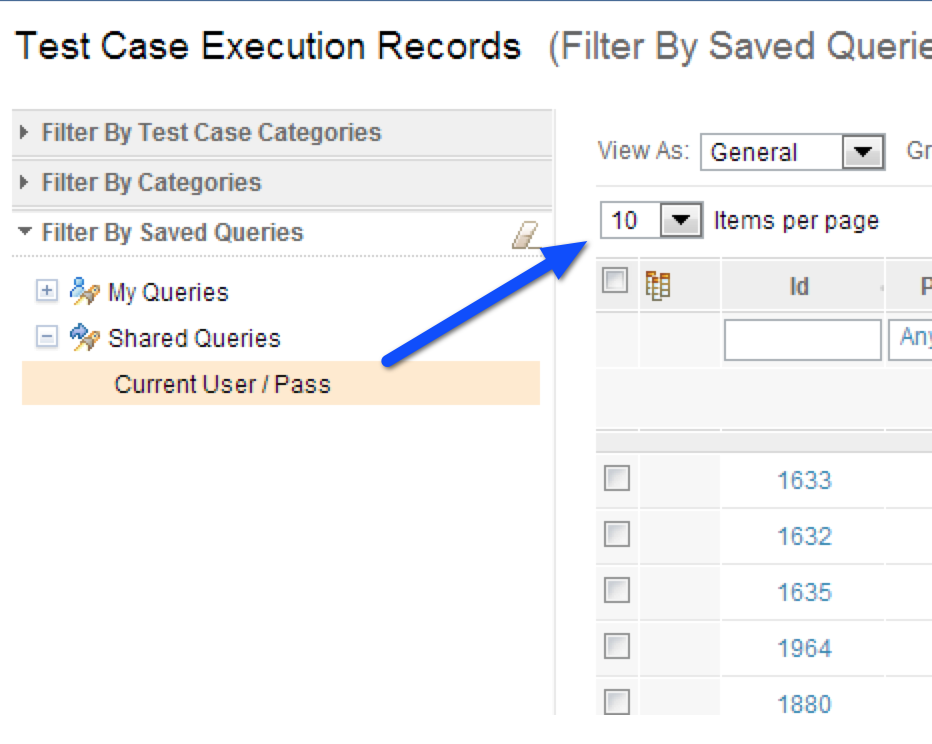
I don’t believe this was announced in the 4.0.5 release notes, but Rational Quality Manager now allows Records Per Page to be saved for a query.

If you don’t know what I’m talking about, it’s the setting shown below.

RQM Items Per Page

Even an IBM expert didn’t realize this change made it in. Very cool.

A client of mine new to 4.0.4 asked for this, and it just so happened to be fixed quickly. So rare that the stars align in this way.

Jazz 405 Is Out

IBM Jazz 4.0.5 Released

  • by
Jazz 405 Is Out
]1Jazz 4.0.5 Is Out

IBM just released IBM Jazz 4.0.5. While you can download 4.0.5 now, I thought I’d cover some compelling reasons to do so.

What’s new in Jazz Team Server 4.0.5

  • You can limit the amount of time that a report runs — good for stopping reports that take too long or that error out.
  • CLM server monitoring is now installed by default. Seems like a few hoops must be jumped through to use it though.
  • Archive and restore process templates: I see this being used to help migrate projects to sandbox servers.
  • Project Members can be searched for within the Manage Project page. Filtering for Project Members
  • Clear the current iteration instead of having to have a default
  • Membership data for projects and teams, including roles, is now sent to data warehouse so it can be reported on.
  • New window to create timelines and iterations (seems cleaner to me, just my opinion)
  • repotools now supports online backup of work item indices

What’s new in Rational Team Concert 4.0.5

  • Can now copy and paste build properties
  • ClearCase Importer has been improved
  • Export source code data query results from builds into a file
  • Improved usability for merging changes containing gaps in history
  • Remote Project Support (Rational Developer for System z and TPF Toolkit)
  • Removal of restriction on promoting Kanban views
  • Improvements on Tag creation and display on Work Items
  • UrbanCode Deploy integration
  • Can exclude components from builds
  • Context-aware search command line command supports SSL and smart cards
  • The ISPF client can accept all for incoming changes (I have no idea what this means, looks mainframe/cobol related)
  • Can set line delimiter handling in source control to NONE
  • Connect to JazzHub from RTC Eclipse Client
  • New help for command-line interface
  • Argument seperator in command-line interface
  • Create Package Wizard has an option to include work items
  • Create Package Wizard has a preview package option.
  • Can query results of package export
  • Ant tasks for packaging and deployment
  • In the web client, you can now view preconditions and follow-up actions.
  • The plan editor has been greatly enhanced
  • Bug fixes for MS Project 2010 export with correct dates
  • Kanban view now reports on exceeded count limits
  • Can migrate plans from pre-4.0.5 releases and include explicit rankings
  • New filtered combo widget (drop-down list searching without using the drop-down list. Pretty nice.) Drop-downs also will show tree views
  • Query results will now show approvals, links, and comments in-line
  • Approvals now bulk-editable in Eclipse
  • Can filter links in query results
  • Links are now bulk-editable in Eclipse
  • Override schedule properties of builds

What’s new in Rational Quality Manager 4.0.5

  • Test Suite runs can be puased, resumed, and stopped.
  • Support for multiple subcategories
  • Reportable REST API for lab resources
  • Subcategory filters in table views
  • Can restore deleted test artifacts
  • Manage categories through heirarchical views
  • New views for category management (show all and show outline)
  • Can create new values from existing values in a different category via drag and drop
  • Test Plans have three new sections: Test Scripts, Test Case Results, and Test Suite Results
  • The test case results for test scripts that have test data associated with them now include the row number of the test data for each step result.
  • New process advisors for state transitions
  • Support for reconciling a subset of requirements collections
  • Various scalability improvements

What’s new in Rational Requirements Composer / DOORS Next Generation 4.0.5

  • Scripting (with warnings against using in production)
  • Drag and drop linking
  • Link creation via Cut and Paste
  • Get hyperlinks for multiple artifacts at once
  • Define preferred link types for artifact types
  • Drag-and-drop reodering of artifacts within a module (finally!)
  • Drag-and-drop artifacts between modules and collections
  • Use OSLC to link to all artifacts in a module view
  • Module scrolling is faster and improved
  • Can now upload a new artifact and include it in a collection or a module in one step (versus uploading, then inserting existing artifacts)
  • Can now control more easily how many levels are shown within a module
  • Embedded images/graphic artifacts are now proportionally scaled within the artifact viewer
  • Search now defaults to the current project instead of all projects
  • Double-clicking now selects an artifacts and the space bar highlights an artifact
  • You can now copy artifacts and create links between the original and duplicated artifact
  • Copy artifacts via drag-and-drop within modules
  • Improved keyboard shortcuts
  • Improved performance while editing within modules
  • Improved scroll preview within modules (it shows up only when needed)
  • Module views available to RRDI
  • New RRDI reports — Requirement List by Collection, Requirements with Execution Results by Collection, Artifact Count, Requirement Counts, Requirements Distribution, Requirements Linked to Test Cases by Collection, Gap Analysis, among many others (must enable them in JTS advanced properties)
  • RRDG exports include printing module in book or table format
  • Quick print of reports without giving parameters
  • Inline view of PDF files in artifacts
  • RDF URIs for the type system
  • ReqIF improvements (to support RDF types)
  • Tips for Requirements Management

I got all of the above information by going to this page, and manually viewing each of the links. The above list does not include all improvements.

My Thoughts

IBM has committed to providing quarterly updates to their Jazz CLM applications. This list is quite big considering IBM’s schedule. RQM probably got the most needed improvements with subcategories, and DOORS Next Generation (DNG)/Rational Requirements Composer is starting to mature nicely. I’m very interested to see how the scripting report works (I believe it uses JavaScript) and how rapidly it matures.

2014 will be a great year for Jazz, particularly for DNG, if IBM can keep their promise of how they intend to version control requirements. That, with reusability, will really have companies who currently use DOORS evaluate DNG seriously.

iOS7 Tip: Restore Lost Contacts

  • by

Ran into an issue with the current iOS7 release with contacts, and figured I’d share.

The other morning my contact list was wiped. No contacts. But contacts were on my Mac. I sign into iCloud and all my contacts are there (and Apple did a GREAT job with the iCloud contacts page, you should really check it out).

I realized that one of my Exchange accounts had its password expire and I hadn’t set a new password. Creating a new password and putting it on my iPhone restored all of my contacts.

Kevin Murphy

Chat with us!

Work with an IBM Champion to master your ELM tools.

Get in touch