Skip to content

IBM Engineering Lifecycle Management 7.0.3 Released!

  • by

It’s not just an area code in the US state of Northern Virginia, it’s also the latest release of IBM Engineering Lifecycle Management (ELM) which includes Jazz Team Server (JTS), Engineering Requirements Management DOORS Next (ERM/DNG), Engineering Test Management (ETM), Engineering Workflow Management (EWM), as well as other related tools like Reporting PUB (RPE) and Global Configuration Management (GCM). Not to sleep on Rhapsody Model Manager as well.

Version 7.0.2 was originally released nearly 3 years ago. Crazy how time flies. This release has been a long, long time coming and we can’t wait to get our hands on it now that it’s officially GAd. Sure, you can visit the new and noteworthy items on Jazz.net to see more details but we’re always interested in changes that haven’t been officially advertised, including an DNG Reportable Rest API enhancement we’ve been waiting years for.

We will eventually cover the best of what’s new. As always, we don’t recommend upgrading your production instance right away. Instead, wait for the first or second iFix and then do your upgrade. Make a backup first, or even better, clone your environment and use a hosts file in the cloned environment to redirect DNS hostnames and test out the upgrade there.

Also, there are quite a few deprecated items. To me, the big one is you must move from WebSphere Application Server (WAS) to WebSphere Liberty. Honestly this is really a great thing even if you’re used to WAS. Liberty is much easier to work with overall.

We have some amazing things coming down the pipe and are very excited about this new release.

In the meantime don’t hesitate to contact us if we can help your organization with DOORS, DOORS Next, ELM, or any other related items, including licensing, DOORS 9 to DOORS Next migrations, and Engineering Lifecycle Management customizations including reporting templates in RPE PUB and widgets and extensions.

A Fresh Face And New Beginnings

  • by

Hi all. It’s been a while. With things getting back to normal in the business world post COVID, I’ve taken time to reflect and direct where I want this company to go.

In that regard I’ve hired a few people recently and one thing everyone keeps saying is “updated your Web site.” And they’re right. Since starting Baselines Incorporated, I’ve been customer focused. Hyper customer focused. And I, myself, will always be. We exist to make our clients happy. Period. We do not fail in that regard and have never failed.

That means the Web site suffers. And that’s not how you grow a business.

Not a real one that can endure, anyway.

Watch this space. We are serious about growing, partnering with IBM and end clients to help get as much value out of the IBM Engineering Lifecycle Management suite of tools as possible. There will be articles, videos, and events.

It’s fitting, as IBM ELM 7.0.2 SR1 is also a new beginning too. The 7.0 release has been a little bumpy as the backend architecture of the tools has been altered, especially in Engineering Requirements DOORS Next, where performance has massively improved. Today, the 6.x versions of the tool are no longer supported. Bottom line: if you’ve not upgraded, it’s time. And we can help.

As the 7.0 tools got a new coat of paint, so does this site. There’s an improved landing page that will be further improved in the near future.

The value this site has provided isn’t going anywhere. The DXL Repository and The DSX Files will continue to be available. And we’ll continue to provide more and more value as time progresses.

Thank you for supporting us for 15 years. Great things are coming.

DOORS Next 7.0 is GA!

  • by

It’s taken a while, but today the wait is over. IBM Engineering Requirements Management DOORS Next 7.0 has been officially released!

As always, IBM has an overview of what’s new and noteworthy. But here are things we’d like to highlight as being significant.

Greatly improved performance

I hear that in some use cases, performance of the tool has gone up anywhere from 4x to 9x! Rumor is that Oracle DBs have shown the most improvements. This is reason alone to upgrade.

DNG has been renamed

It was not only DOORS Next Generation, but every tool has now been renamed. This was announced about a year ago by IBM. I’m still getting used to it, as are our clients. DOORS Next got the easiest adjustment.

Suspect Links Have Been Replaced With Link Validity

It’s no secret that IBM developers sometimes overcomplicate things. Suspect Links vs. Link Validity is one of those things. It took me a while to wrap my head around the concept.

Starting in 7.0, there is only Link Validity. I think this is a good thing overall and look forward to simplifying the explanation of things to my users.

This also corresponds to Link Validity being reportable in JRS! I worked really closely with IBM support to develop a report for one of my clients in 6.0.5, and it’s great to know that pain is now gone.

View columns are preserved when you switch to folders

In previous versions of the tool, you’d be in your folders view, and insert a few columns. Then you’d click a new folder, and you’d lose your columns. I worked with the DOORS Next developers on this and gave them feedback on how it should work. My feedback has been incorporated into the tool.

Yellow row highlight for new and copied artifacts cleared automatically

My users asked for this years ago, and now they have received.

Module and Collections pages no longer show the base artifacts folder

Chalk up another implementation that I’ve been asking for, for years. This is huge from a usability perspective.

Automatic type mapping for ReqIF imports

If you are involved in multiple imports/exports from ReqIF files, this should make things much smoother and less error prone.

Improved pages for empty collections and modules

Yet another one I’ll take some credit for — I’ve given DOORS Next developers feedback that it was not obvious to users how to paste an artifact into an empty module. It is now obvious.

ELM 7.0 – What’s New

  • by

IBM released Engineering Lifecycle Management 7.0 for general release today, and while we’ve covered Requirements Management with DOORS Next in some detail, we wanted to also cover highlights of the rest of the suite.

Engineering Lifecycle Management

Name Changes

All of the applications have had their names changed, for better or for worse. I think some of these are going to have a hard time sticking. That said, here are the new names across the board:

Old Name Old Acronym New Name New Acronymn
Rational or Collaborative Lifecycle Management or Continuous Engineering CLM or CE IBM Engineering Lifecycle Management ELM
Rational DOORS DOORS DOORS Family DOORS
Rational DOORS Next Generation DNG DOORS Next DOORS Next
Rational Rhapsody Rhapsody
Rational Rhapsody Design Manager RDM Rhapsody – Design Manger RDM
Rational Rhapsody Model Manager RMM Rhapsody – Model Manager RDM
Rational Quality Manager RQM Engineering Test Management ETM
Rational Team Concert RTC Engineering Workflow Management EWM
Rational Publishing Engine RPE Publishing PUB
Rational Engineering Lifecycle Manager RELM Engineering Insights ENI
Rational Method Composer Method Composer MEC

The above is not the official IBM names to a T–I’ve slightly abbreviated some things. Keep that in mind.

New Look And Feel

The product banner looks much more modern.

Engineering Test Management

Clustering with Liberty Server

In theory this will improve performance. Please contact us or leave a comment below if you’re using this feature.

Improved Test Execution Performance

500 adapters running in parallel are supported! Pretty huge improvement there.

Mail Notifications

I actually developed a workaround for not having this years ago. It’s finally in the tool, fully supported!

LQE Manage Skipped Resources

You can ignore individual resources when LQE fails on a given artifact. Again, big improvement here.

Customize The “Related Information” Panels

I’ve never had a client ask for this, but I’m glad this is there.

Engineering Workflow Management

Improved Git Integration

  • Command line script to make installation easier available for Node.js and Gitlab servers.
  • Integration with Bitbucket server
  • New process preconditions for Git Push operations

Duplicate a Change Set

This is interesting and I am not sure of why you would want to do this, but you can duplicate an active change set in Eclipse and Visual Studio.

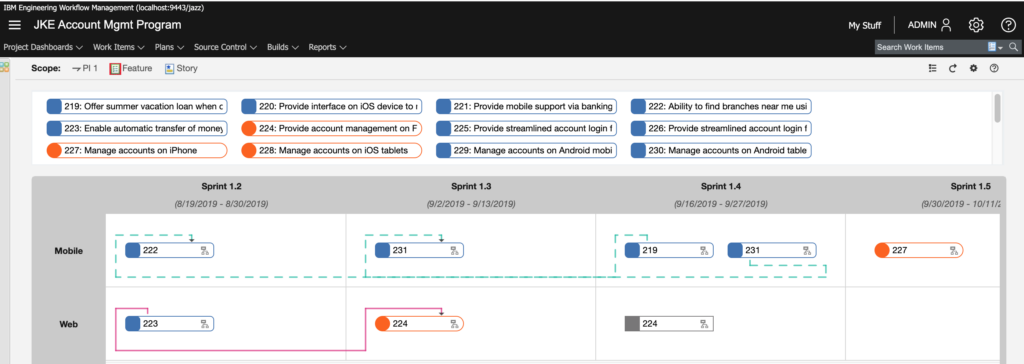
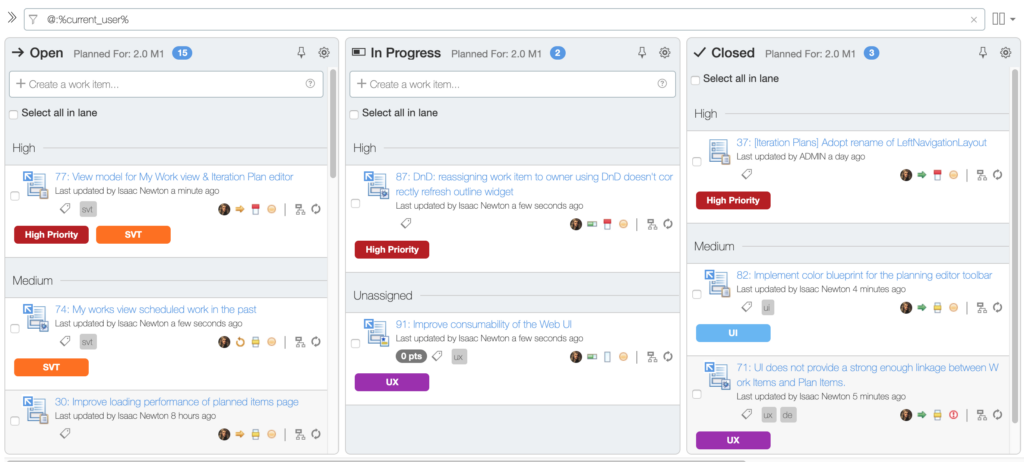
Improved Look and Feel for Quick Planner and Program Board

The program board in particular looks fantastic! Of note, color tags are supported as well.

EWM 7.0 Program Board Improvement
Color Tags in Quick Planner EWM 7.0

Publishing (Previously Rational Publishing Engine)

Unfortunately, there’s not much to report here as far as our interests. The improvements appear to have all gone to Document Builder and not to the Publishing thick client.

As an aside, it’s going to be very difficult for me to call it just “Publishing.” Really wish Publishing Engine had stuck instead.

Jazz Report Builder (JRS)

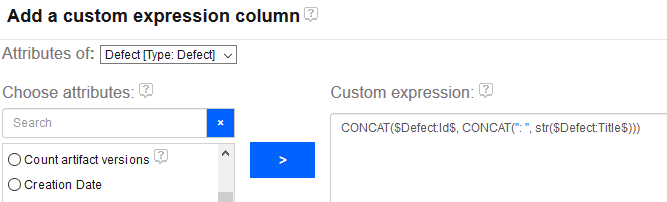
Custom Expressions Support Multiple Attributes

Previously, a report author could only create a custom column with a calculation on a single attribute. For instance, it was not possible to calculate a RPN for an FMEA-style report by creating a custom column that inspected both Likelihood and Occurence. You could only make a column that say, truncated Likelihood and that’s it. This was a *severe* limitation.

Enter version 7.0!

IBM Engineering Virtual VoiCE 2020

  • by

You may have heard that with the COVID-19 virus spreading around the world, that IBM made the decision to cancel this year’s IoT Exchange 2020 slated to be held in Orlando, Florida.

If you are a member of VoiCE, you should have received an email announcing Virtual VoiCE sessions for next week.

This email does a poor job of highlighting the fact that if you want to attend any of these sessions, you must respond to it. They are not merely announcing the Virtual VoiCE conference, but they are asking for you to reply so you can be invited.

Just wanted to give everyone the heads up.

The DSX Files Released!

  • by

We are pleased to announce the release of our latest utility: The DSX Files. This utility will help report authors/developers who use IBM ENI Publishing (aka Rational Publishing Engine) to develop document export templates against IBM DOORS Next.

Please read more about its features here.

Major IBM CLM 6061 iFix003 Issue

  • by

I had a client find out the hard way about a huge issue in CLM 6061 iFix003. Essentially, if you use JRS to report against CM-enabled projects, JRS can no longer see configurations.

If you use JRS to report against configuration management opted-in projects, and are on any 6.0.6.1 application, do not update to iFix003.

The good news is that if this happened to you, the solution is simple: remove iFix003. For JRS, this means replacing the war file–so keep that in mind.

CLM 6.0.4 Released

  • by

Just wanted to give a heads up that IBM CLM 6.0.4 was released yesterday on jazz.net. Keep watching this space for details of new features.

IBM CLM 6.0.3 Released!

  • by

IBM released the latest version of Collaborative Lifecycle Management (CLM) 6.0.3 a few weeks ago. As always, I like to go over the highlights.

DOORS Next Generation 6.0.3

This release feels a bit more focused as far as improvements go. If you’ve opted in to Configuration Management, you’ll notice that there is now support for components, allowing you to more easily setup your projects for CM. You’ll no longer need a separate DNG project area for each system your needs, but rather you can create one DNG project and then define components of that project.

If that sounds confusing, worry not, as I’ll be covering components in detail very soon.

You’ll also notice that navigation has been streamlined. In previous versions  of DNG, there was an Artifacts menu and a Modules menu. Now there is just an Artifacts menu and it can be filtered to just display modules. And filtering is a bit easier.

ReqIF has also been enhanced, especially for those of you migrating from DOORS 9. For DOORS 9 users, you can know map Object Type to Artifact Type for everything except modules. This is YUGE. It’s such a big deal that I used one of the 603 milestone releases to test it out and actually found a bug that development fixed before release. This functionality can be enhanced to be sure, but I’m just very glad that it’s finally there.

The diagram editor now allows for UI diagramming. Things like menu bars, sliders, radio buttons, etc.

With 6.0.3, DNG users can link across projects.

There have also been miscellaneous improvements that have not been called out explicitly by IBM. One that I noticed, directly from one of my clients is this: In DNG, when working in a module and pressing control-enter to create a new requirement, there was a 2-3 second delay while the old requirement was being saved. During this delay, the user could not write their new requirement. They had to wait for the 3 seconds and then they could write. This tiny thing was fixed, and it really does make the tool feel faster, especially for those of us who heavily use keyboard shortcuts.

Rational Quality Manager 6.0.3

RQM 6.0.3 also supports components.

RQM 6.0.3 now features global categories! You can also make certain categories apply to multiple artifact types.

RQM also now has a compare artifacts feature, and along with version history, it’s pretty jazzy (no pun intended) if I do say so myself.

You can now link RQM artifacts directly to files source controlled in RTC! I haven’t tested this yet but I’m glad the functionality to link to files is finally there.

RQM 6.0.3 now supports drag and drop linking and better artifact navigation.

Rational Team Concert 6.0.3

Lots of tweaks for builds are in RTC 6.0.3. Log files can now be filtered (ie, show me logs with errors), timestamps can be preserved on load and improved Jenkins compatibility. Build engine definitions can now be imported and exported.

The Eclipse thick client now requires Eclipse 4.2. Eclipse 3.6 is no longer supported.

The Visual Studio plugin now supports task editing.

Files in SCM can be linked to other CLM artifacts, as mentioned above in the RQM section.

A pending changes view has been added to the Windows RTC shell.

Git integration now supports work items with a hashtag keyword. So you could say, “This changeset addresses task #786” and the integration will know what you’re talking about.

You can more easily display all changesets implemented during a given release.

There’s undo merge functionality.

Jazz Report Builder 6.0.3

Here’s the big one on this release: You can trace multiple relationships from the same artifact.

The displayed columns of a report can now be rearranged via drag and drop. Column widths can also be set and be sticky.

A report can now have multiple owners set.

There’s a new “tour” guide for new users.

Dialog boxes are now resizable.

Types and attributes now have a pop-up tooltip type help system.

You can filter on multiple text values when a report is run.

The order of the legend in the graph can now be set.

Users can filter report via component (via LQE).

There really is much more, including new trend reports, new SCM file reporting capability, curved trend lines among others.

Kevin Murphy

Chat with us!

Work with an IBM Champion to master your ELM tools.

Get in touch